Tryon AI Release Notes
Sept 30, 2026 | Tryon AI 2026 Fall Release
Version 3.2.0

It’s time to level up your fitness!
Whether you’re training for a race, building strength, or trying to stay consistent, this release brings your past, present, and future training together. We’ve completely redesigned Fitness to help you plan your workouts, understand how your body is responding, and follow your progress along the way.
We’re also introducing an all-new Timeline with more flexible food logging, and improvements to Tryon AI Intelligence.
This release includes:
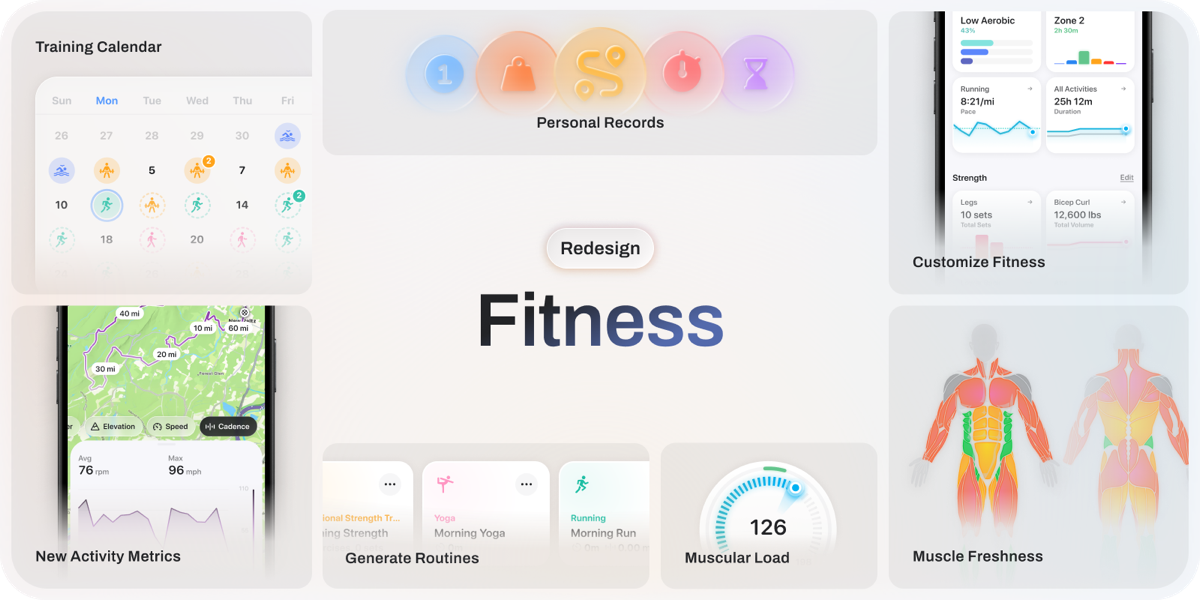
Training Calendar: Review past activities, plan upcoming workouts, and manage training plans, all in one calendar.
Muscular Load & Muscle Freshness: Understand how much load you’re putting on each muscle group and how recovered your muscles are.
Routines: See your cardio and strength routines (previously called Templates) in one place, and schedule them in your Training Calendar.
Customizable Charts: More ways to track your strength and cardio progress, with options to pin and reorder the charts that matter most to you.
Updated Activity Details: Refreshed charts, more detailed splits and intervals, running-form metrics, and multisport breakdowns.
Personal Records: Track your best performances across strength training, running, cycling, and swimming, from your heaviest lifts to your fastest times.
All-New Timeline: Your activities, sleep, food, and other daily events in one view, with new ways to manage food logs and plan meals ahead.
Tryon AI Intelligence Improvements: More detailed workout context, improved memory, and faster responses.
Plus other quality improvements and bug fixes across the app.
Please note that this is a phased release over seven days. If you want to update immediately, you can download it from the App Store here.
Watch the Announcement


Redesigned Fitness
Health and fitness aren’t one-size-fits-all, and your Fitness tab should reflect that. We’ve redesigned Fitness to bring your training plans, Cardio and Muscular Load, and progress together, with the flexibility to choose what you want to see.
If you’re training for a race, you might want to keep your running distance and pace front and center. If you’re focused on building strength, you might follow your Bench Press 1RM progression and Muscle Freshness. You can now pin the charts that matter to you, reorder sections, and hide what you don’t need.
Training Calendar
The new Training Calendar brings all your historical and planned activities together. Open it from the top left of Fitness to review your history, see upcoming workouts, and filter by activity type or metrics like distance and elevation.
Create Your First Plan: Tryon AI Intelligence will guide new users through creating a plan around their goals. For the first time, free users can try this too!
Bring Your Existing Plan: Already have a plan from Tryon AI Intelligence? You can migrate it to Fitness and continue making adjustments through chat or scheduled check-ins.
Manage Planned Activities: Find upcoming workouts in Today’s Activity and the Training Calendar. Start them on Apple Watch, mark them as skipped, or link them to completed activities. Workouts started from a planned activity, or completed workouts with the same activity type, will link automatically.
Muscular Load & Muscle Freshness
We know how much you’ve enjoyed Cardio Load, so we wanted to bring the same concept to your muscles. We’re introducing Muscular Load and Muscle Freshness to help you understand how your muscles are responding to training, both overall and by muscle group.
Muscular Load: Tracks the load on your muscles across strength and cardio workouts, using details like weight, reps, sets, and perceived effort (RPE) for Strength Builder, and muscle groups per activity type for cardio activities. Similar to Cardio Load, it compares your short-term and long-term load, with statuses like Productive, Maintaining, and Overtraining. For example, your biceps may show Overtraining while your Hamstrings show Detraining, helping you spot muscles you may be overworking or neglecting. Each muscle requires 1-2 workouts per week in the past 6 weeks to calibrate.
Muscle Freshness: Shows how recovered each muscle group is, with statuses like Recovered, Fatigued, and Depleted. It uses your training history and load over time to learn your personal recovery baseline. For example, after a run, your legs might be Fatigued while your upper body remains Recovered, helping you decide what to focus on next. Each muscle requires three workouts in recent training to calibrate.
Explore both metrics by muscle group, or use the Muscle Map to see where your training is concentrated and which muscles may need more attention. Tryon AI Intelligence can also use these insights to guide your training plans.
Routines
Templates are now called Routines. Strength and cardio routines live together in Fitness, where you can manage, schedule, or start them directly on your Apple Watch. You can also create, edit, and start Routines directly from Tryon AI Intelligence.
We’ve also added 200+ new exercises you’ve asked for to the Strength Builder library. If an exercise is still missing, you can always ask Tryon AI Intelligence to create a custom one.
Customizable Charts
See how far you’ve come, and keep your next goal in focus. Fitness charts now give you more ways to explore your progress and pin the activities and metrics that matter most to you.
Activity Charts: Duration, distance, elevation, energy, pace, speed, heart rate, power, and cadence, depending on the activity.
Cardio Charts: VO₂ Max, Heart Rate Recovery, Cardio Focus, and a new Heart Rate Zones chart.
Exercise Charts: Estimated 1 Rep Max, Heaviest Weight, Volume, Sets, Reps, and Longest Duration for timed exercises.
Muscle Charts: Volume, Sets, Muscular Load, and Muscle Freshness.
We’ve also added a Year to Date option, cumulative and segmented views, and options to aggregate data by day or week.
Tap Edit in the Cardio or Strength section to manage your pinned charts, or pin a view directly from a chart’s menu. Each pin saves your selected metric and settings, so you can return to that exact view anytime.
Activity Details
We’ve redesigned Activity Details with more metrics, refreshed charts, and more detailed workout breakdowns.
Charts & Maps: Scrub through your workout to see metrics together and follow your position on the map. We’ve also added a cadence chart, satellite view, and chart reordering.
Running Form: New charts for vertical oscillation, stride length, and ground contact time, which Tryon AI Intelligence can use to better understand your running form and efficiency.
Splits & Intervals: Switch between split distances and see metrics like power and cadence for each split or interval.
Training Metrics: Added Muscular Load and muscle breakdowns, alongside refreshed Cardio Load, Heart Rate, Heart Rate Zones, Cardio Focus, and Heart Rate Recovery views.
Multisport Workouts: See the full workout, including transitions, then open each activity for more detail.
Personal Records
All that progress deserves to be celebrated. Personal Records now track your best performances across strength and cardio.
Strength: Heaviest Weight, Estimated 1 Rep Max, Session Volume, Set Volume, Set Reps, Lowest Assistance and Longest Time.
Running: Longest Run and Fastest Time for various distances from 5k to a marathon.
Cycling: Longest Ride, Most Elevation Gain, Fastest Time for various distances, and Best Power over 5 seconds to 20 minutes.
Swimming: Longest Swim and Fastest Time across both pool and open water distances.
Find your records within the corresponding activity or exercise chart, and see new achievements in Activity Details. Tap any record to view your top 10 efforts.
All-New Timeline
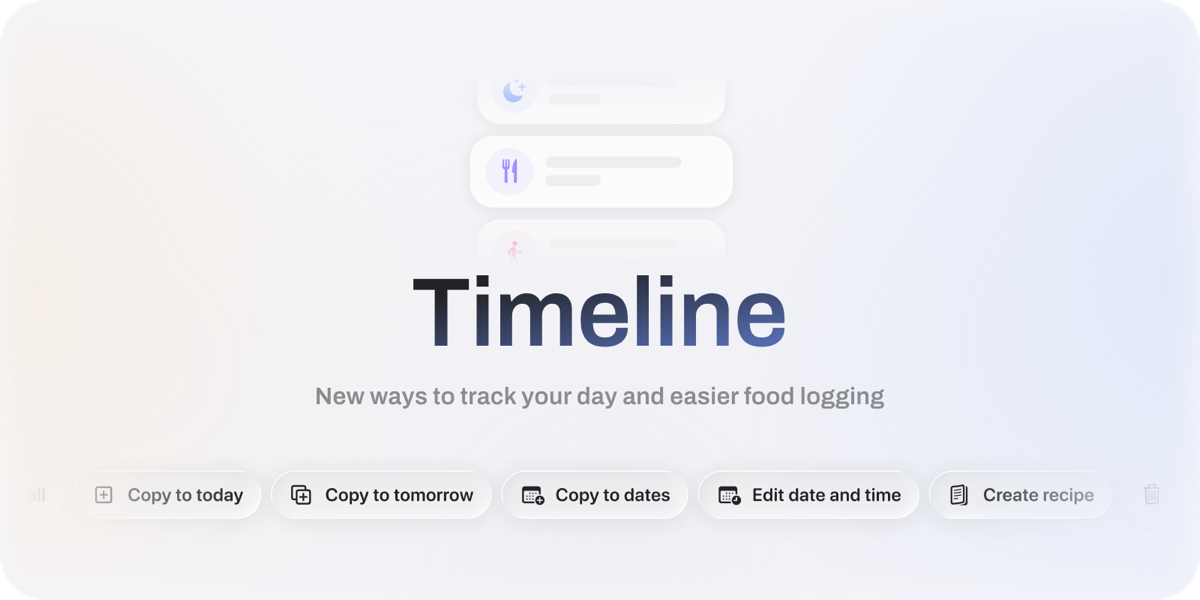
Timeline brings your activities, sleep, food, and other daily events into one chronological view. You can quickly log throughout the day, see how everything fits together, and plan meals ahead of time. To add the Timeline, tap Edit Home > Add Card > Timeline.
What You’ll See
Pinned Metrics: Pin your favorite scores, macros, and micronutrients to the top of Timeline. For nutrition, you can switch views between consumed and remaining amounts and view your goals by weight or percentage.
Grouped Food Logs: Foods logged at the same time are grouped together, so you can see the meal’s macros at a glance or tap in for full nutrition facts.
Future Logging: Log foods for future dates to plan upcoming meals directly in Tryon AI.
Copy Foods: Copy foods to today, tomorrow, or multiple days at once.
Food Log Editing: Change the date or time, select multiple foods, and turn selected foods into a recipe.
Swipe to Delete: Quickly delete food logs and activities.
We’re continuing to expand the Nutrition Database, with thousands of foods already added and more on the way. Please keep reporting foods and submitting custom foods when something is missing.
Tryon AI Intelligence Improvements
Tryon AI Intelligence continues to get faster and more useful across your day. These are some of the major improvements we've made:
Workout Context: Tryon AI Intelligence now has access to full workout details, giving it more context to help you understand your performance.
Daily Context: Improved overnight memory maintenance keeps your daily context cleaner and more coherent.
Long-Term Memory: Improved how preferences, goals, and corrections carry across conversations.
Text Selection: You can now select and copy text from your own messages.
Response Speed: Improved response speed across conversations.
Please keep sharing feedback on Tryon AI Intelligence. We review every report submitted through the 👎 button in chat, and it’s the fastest way for us to identify, address, and fix the issues you’re experiencing.
Other Fixes & Improvements
In addition, we’ve fixed several bugs across the app.
Bug Fixes
Fixed Vegetable Contributor scoring to use a daily 150g target instead of calorie contribution, for more accurate Nutrition Scores.
Fixed an issue where Nutrition data on Apple Watch could be out of sync with the phone.
Fixed an issue where Journal entries could be saved on the wrong day.
Fixed an issue where an ended contraceptive still showed as ongoing.
Fixed an issue on iOS 18 where some Settings were not clickable, including Report a Bug and legal links.
Fixed a rare crash when Tryon AI received multiple data updates at the same time.
That's everything for the 2026 Fall Release! Whether you’re chasing a new PR or building a more consistent routine, we can’t wait to see what you do next. We have more improvements to food logging coming soon, so stay tuned.
If you have suggestions or want a feature prioritized, please check out the feedback board and upvote posts you support. We will try our best to prioritize posts with higher upvotes first.
Please report any bugs or issues in the Tryon AI app > Settings > Report a bug.
Rate Tryon AI
If you enjoy Tryon AI, do you mind leaving a review on the App Store? It would help us tremendously. Thank you!